Costs
Users will often want to enter data to reflect one-time construction or improvement costs, as well as on-going costs associated with operations and maintenance of facilities. The Costs page is where this data is entered.
In TREDIS, costs are defined for each year selected for either year, region, and facility.
Conceptually, the label "costs" reflects the use of these inputs in the Benefit-Cost Analysis, where the inputs are used in proportion to benefits. Keep in mind, however, that for an Economic Impact Analysis, "costs " are treated as spending that boosts economic activity.
Basic vs. Advanced Views
TREDIS has two views of costs: "Basic" and "Advanced". You can move between the two by using the Go to Advanced or Go to Basic buttons at the top right of the page.
-
Basic view prompts you for just two numbers for each region: Total Construction Costs and Annual Oper & Maint Costs. These are appropriate for a sketch analysis or if you do not have detailed information.
-
Advanced view allows you to enter a detailed breakdown of these numbers among multiple spending categories and all years of construction and operations.
By entering your totals first in the Basic view and then clicking the Go to Advanced button, you can see directly how TREDIS distributes the Basic inputs to categories and years.
Facilities
Each mode in TREDIS associated with a facility. The facilities available for input depend on the modes and purposes selected in the Modes page. TREDIS differentiates among 4 facility types, defined as follows:
-
Road facilities are for all passenger cars, trucks, and active modes, including pedestrian and bike.
-
Rail facilities are for all kinds of train, including passenger and freight, heavy and light.
-
Air facilities are for all kinds of aircraft, including passenger and freight.
-
Marine facilities are for all kinds of sea or maritime travel, including passenger ships, small craft, ferries, and freight shipping.
Buttons
At the top right of any view on the Costs page, 2 buttons are available.
Either a Go to Advanced or Go to Basic button will appear to allow you to switch between Basic and Advanced views. If you switch back to Basic view from Advanced, any details you entered in Advanced will be discarded (with a warning before TREDIS does this).
The Save button saves any changes in the current grid you are viewing. The Save button will change color to remind you to click it if you make any changes, and colored ticks on the boxes indicate values that have changed since the last save.
There are some alternate ways to enter or affect costs in TREDIS that can be accessed using the buttons at the bottom of the Costs page. Click the links below for details.
-
The Cost & Revenue Sharing button opens a window to allocate costs and revenue between public and/or private entities.
-
The Useful Life Settings button opens a window to change the useful life span of facilities for your project.
-
The Quantities and Unit Costs button opens the a window to enter costs in an alternate format.
Using the Basic View
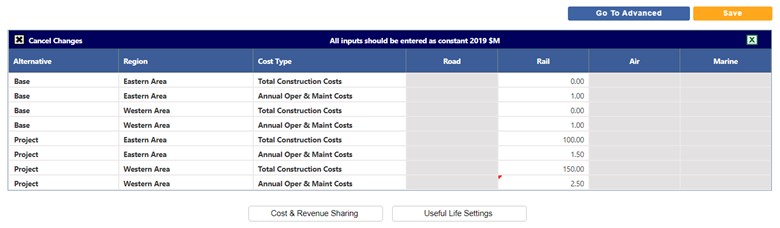
The Basic Costs View is useful for entering only a few numbers when only totals are available for cost estimation.
-
Total Construction Costs. Each line for Total Construction Costs indicates the cost of the entire project’s investment, to be spread across all construction years (as designated in the Timing page). The entire sum of the project investment (within the region and facility) is expressed in a single sum and represents a one-time total.
-
Annual Oper & Maint Costs. Each line for indicates costs that recur annually, whether for maintaining infrastructure, operating services, or other. These recur over every year in the Operations Years defined in the Timing page.
TREDIS allows entries for Road, Rail, Air, and Marine facilities, showing only those that are applicable to the modes selected on the Modes screen.
All inputs are in millions in the constant dollar year of the project.
The following figure shows the Basic view on the Costs page for a project that is Facility Based and has two regions defined. Only rail modes were selected on the Modes page, so only the Rail facility is editable. Notice there is no explicit External region.
Using the Advanced View
The Advanced Costs View allows you to enter detailed costs broken down for each spending category. In addition to expanding the spending categories, it allows you to enter costs by year.
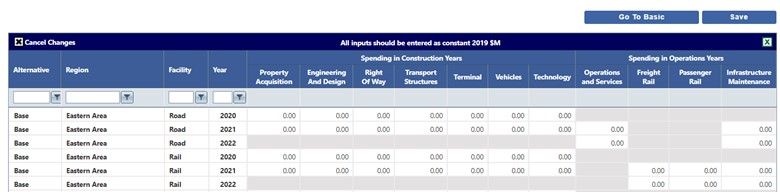
Similarly to the Basic view, the Advanced view will include an External region for projects that are O-D Based, but will not include one for Facility Based projects.
Notice that the Spending in Construction Years are available to input for every year of your Construction, and the Spending in Operations Years are available for input for every year of Operations, both set on the Timing page.
If there are many rows of inputs, you may want to filter using the controls on the header row.
Capital Costs
Capital costs are typically for long-term investments made on a one-time basis. The years that capital costs are entered are the years chosen as Construction Years on the Timing page. The categories are defined as follows:
-
Property Acquisition. Right-of-way purchases or easements.
-
Engineering and Design. Soft costs of construction, including planning, analysis, legal, architectural, engineering, and design work.
-
Right of Way. Earthmoving, grading, drainage, and paving. For railroads, this includes all expenditures on the laying of rails; for airports, this includes runway construction.
-
Transport Structures. Construction of culverts, road bridges, flyovers, railroad bridges, and marine docks.
-
Terminal. Operations offices, maintenance facilities, airport/bus/rail terminals, and storage buildings.
-
Vehicles. Acquisition of rail cars and engines, ferries, airplanes, barges, or maintenance or service vehicles.
-
Technology. Intelligent transportation systems (ITS), communications equipment, electric vehicle infrastructure.
Operational Costs
Operational costs are recurring costs expended on an annual or periodic basis. The years that operational costs are entered are the years chosen as Operational Years on the Timing page. The categories are defined as follows:
-
Operations and Services. For Road, Air, and Marine, operations costs for highway toll collection, systems operation, or incident management.
-
Passenger Rail. Costs for operations for Passenger Rail, including systems operation, or incident management.
-
Freight Rail. Costs for operations for Freight Rail, including systems operation, or incident management.
-
Infrastructure and Rehabilitation. Crack repair, repaving, or vegetation control; also includes vehicle servicing.