Travel
The Travel page is where you enter data reflecting travel. This is an extensive page with multiple subtabs and buttons available to capture all the ways that travel can change between Base and Project alternatives. This page gives an overview of the primary use and functionality, while stand-alone help pages cover individual tabs and buttons.
For details on specific tabs and buttons, see the Tabs on the Travel Page or Buttons on the Travel Page subsections for listings for all tabs and buttons.
Travel Data Entry and Tabs
The primary means for entering travel data in TREDIS is via a series of tabs, each of which has a data entry grid. Data can be manually typed, or it can be copy-pasted into the grid as if it were an Excel sheet. (If you do this, be careful, since you may be pasting into grayed out areas or outside of the grid.)
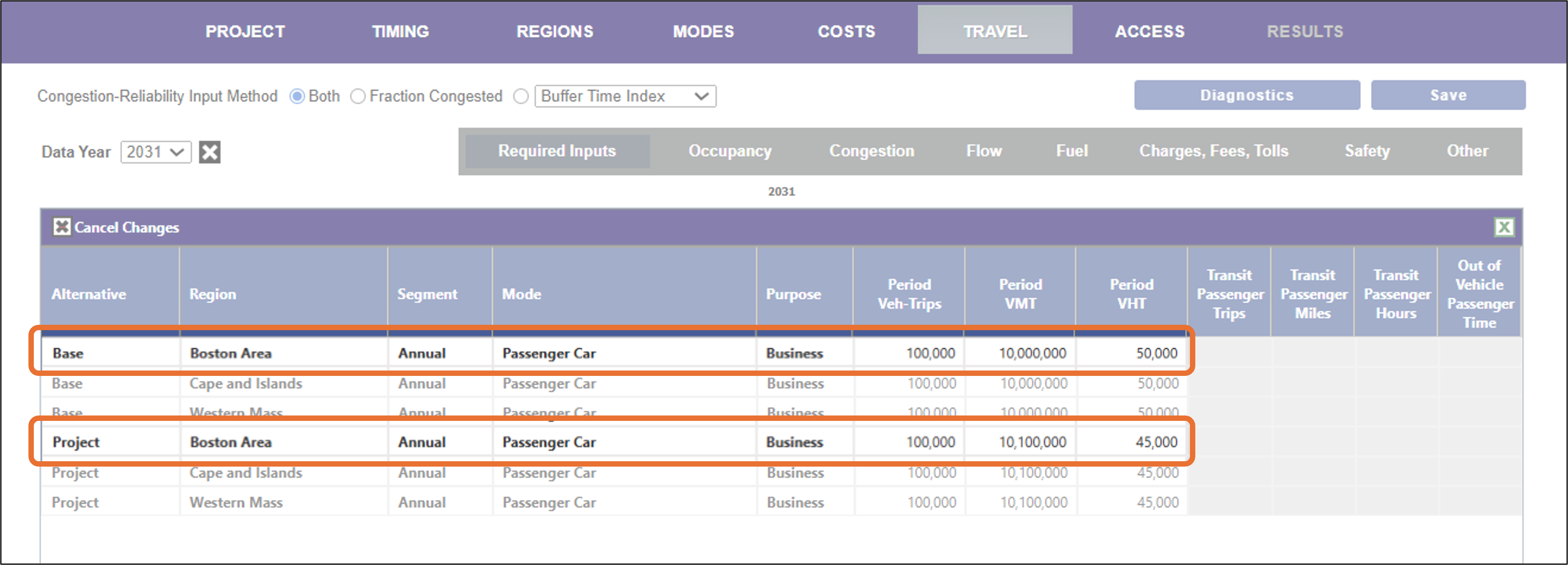
For Facility Based Projects, each row of data is defined by the Alternative, Region, Segment, Mode, and Purpose of the row, so the data entered only refer to that subset of travel. The rows where the Alternative is "Base" represent together the annual travel in the Base Alternative for the given Data Year (indicated on the upper right next to the Data Year control) – and the rows where Alternative is "Project" represent the annual travel in the Project alternative.
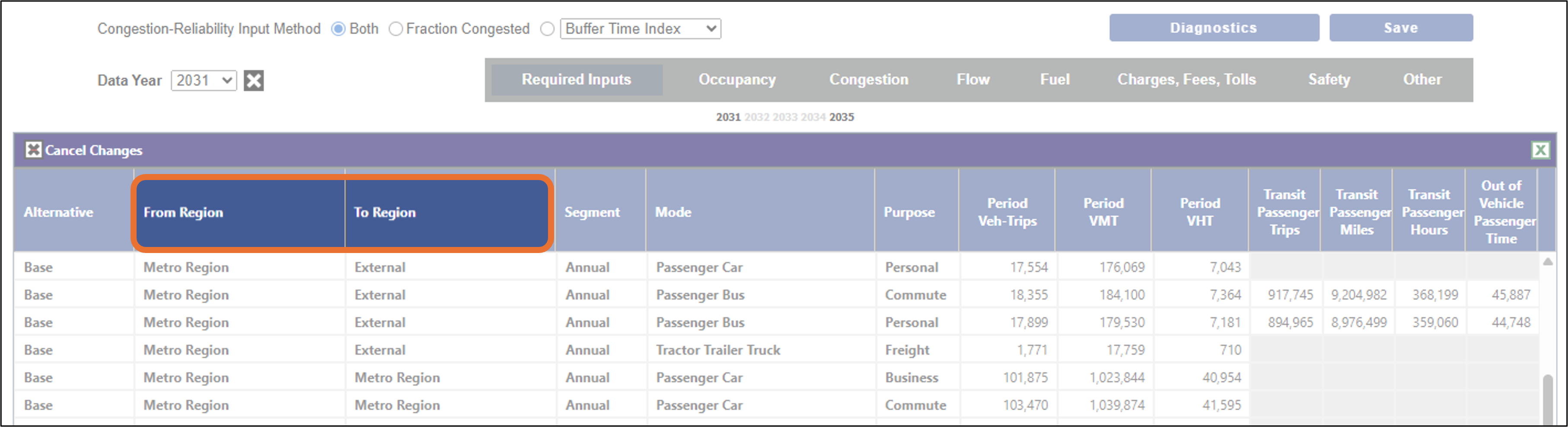
For O-D Based Projects, the same is true, except Region is replaced by two fields: From Region (the origin region) and To Region (the destination region).
The primary data needed are entered on the Required Inputs tab. In TREDIS, economic benefits and impacts of the project are typically driven by differences in the Base and Project alternatives for metrics, especially those on the Required Inputs tab. As in the two rows above, the Region, Segment, Mode and Purpose columns all match values, but differ only by the Alternative. The differences in the Period VMT and Period VHT columns in those rows will often drive changes in the results, though this depends on the changes being modeled between Base and Project alternatives.
For private modes these data are primarily vehicle trips, vehicle miles traveled (VMT), and vehicle hours traveled (VHT). For transit vehicles and passenger aviation, these are passenger trips, passenger miles traveled (PMT), and passenger hours traveled (PHT) (though vehicle trips, miles, and hours can be entered for these other modes as well).
Other tabs are optional, but the same principle applies: Differences between the Base row and Project row for any combination of Period, Segment, Mode and Purpose reflect differences in the Base and Project alternatives. Data on other tabs may not be needed for your project if metrics are not expected to change or no localization is needed. See the Default Factors and Data Sources document for information on TREDIS defaults for many of these measures.
Note: For each analysis you do that is Facility Based, consider carefully the Flow tab. Lacking any project-specific information, the defaults for a new project assume all travel is within a region. This will not always be appropriate and leaving the defaults may result in overestimation of economic impacts for the region of interest. This is because any benefits for a trip that is 100% internal to the region are counted entirely for the region, whereas trips leaving or entering the region count for 50%, and through trips do not count at all for many purposes. This means it is easy to overestimate economic impacts if there is significant incoming, outgoing, or through traffic that is not accounted for on the Flow tab. For a BCA, the Region where benefits are enjoyed may not matter for the analysis, though if you are intending to differentiate benefits by Region it will make a difference.
Another condition to consider is if there are more passenger or freight-ton trips in the Project Alternative than the Base Alternative in a given year. This indicates inducted travel, and you should be aware of this and consider whether you will be accounting for the additional trips as induced. To do so, click the Trip Balancing button, which will automatically turn red if unbalanced trips are saved.
Travel Data Across Years
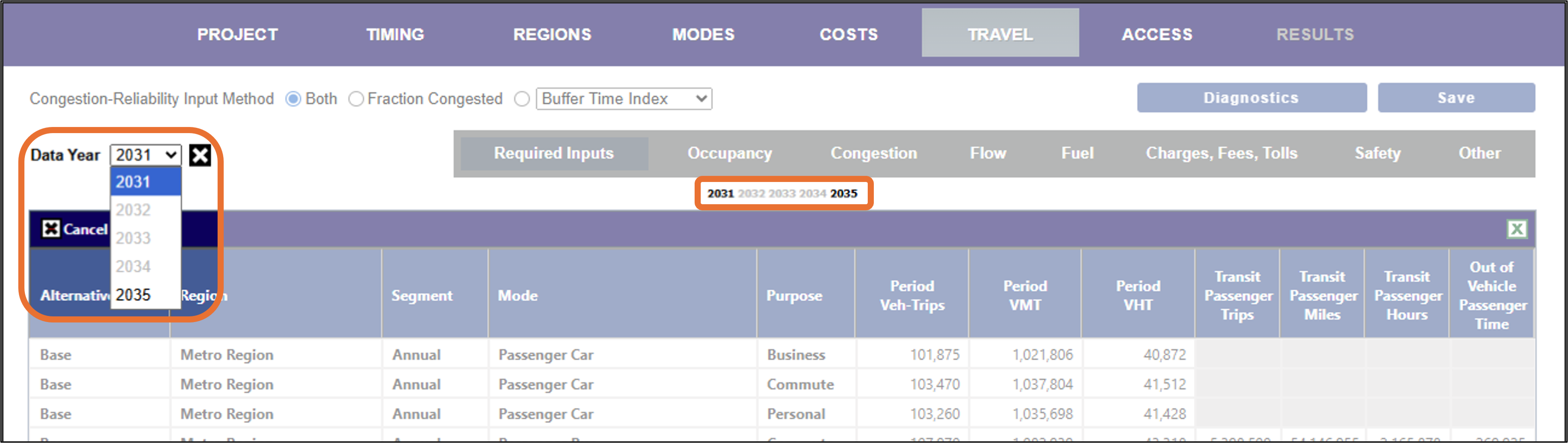
When first visiting the Travel page, the first Operations year is selected in the Data Year dropdown and the corresponding data is shown in the data entry matrix. In the years listed left-to-right, any year with data entered is in bold font. (The default is to consider this first Operations year as having been entered, since at least one year of data is needed for a TREDIS project.)
To delete entries for an entire year, select that year in the dropdown menu and then press the X icon to the right of the Data Year dropdown.
TREDIS will interpolate and extrapolate travel data for any years not entered. See the section describing the Results Settings page for more information on choosing the interpolation method.
Facility-Based vs. O-D Based Projects
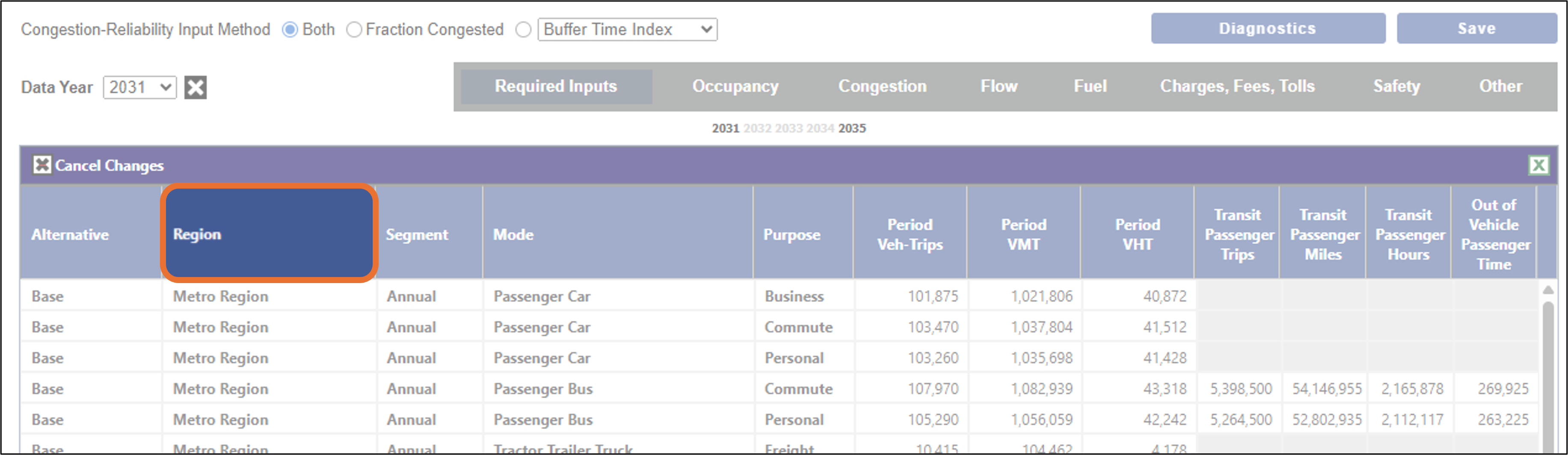
In the Project page, when a project is first created, its Travel Analysis Type can be set to be "Facility Based" or "O-D Based". In Facility Based projects, all fields on the tabs in the Travel page are entered by Region, starting with the required inputs such as vehicle trips, miles, and hours of travel. The proportions that are internal, incoming, outgoing, and through are indicated on the Flow tab. In the figure, travel is entered for each region.
In contrast, in O-D Based projects, all fields on the tabs in the Travel page, including data on trips, miles and hours of travel, are entered on rows where each row is a combination of Regions, with a separate row for each combination of From Region and To Region. "External" in this case is counted as a Region in addition to any Regions defined on earlier on the Regions page.