Trip Balancing
When the total passenger trips for a given purpose rise between the Base and Project alternative, they are said to need "balancing" to indicate to TREDIS what portion of trips are induced by favorable transportation conditions.
Overview and Context
Trip balancing means differentiating the fraction of trips that can be considered "in-model" vs. those considered "induced."
"In-Model" trips represent trips that were undertaken in the Base alternative as well as the Project alternative, and which are assumed to have the same value for the people undertaking them.
"Induced" trips represent new trips undertaken in the Project alternative because travelers found new travel conditions that made a journey worthwhile when they were not in the Base alternative.
TREDIS assumes that the economic conditions are the same in any tested alternatives for a single scenario, so a different level of population and employment should not be the cause of trip "imbalance."
In some cases, a change in the number of trips between Base and Project alternatives is represented by in-model changes or a change in what inputs represent.
For example, if journeys made as one trip in the Base alternative are reported as two in the Project alternative – for instance, if a single bus trip now includes a transfer – the difference in the number of trips should be considered "in-model" because they don’t represent new journeys.
Another case where differences might be in-model are in mode switching. If some percentage of commuters that drive have switched to bus, the number of bus passenger trips is likely to have risen, but the difference is "in-model" since only the mode has changed.
Induced trips are journeys that were not available or feasible in the Base alternative. For example, if highway speeds have improved due to an additional lane in the Project alternative, more trips may be undertaken versus the number in the Base alternative because of the marginal cost in time.
Differences in trip counts due to technical constraints in a microsimulation model should be handled before TREDIS rather than by the Trip Balancing window.
The Trip Balancing Window
To launch the Trip Balancing window, click on the Trip Balancing button at the bottom of the Travel screen.
The Travel page shown below has increases in total trips between the Base alternative and the Project alternative. The occupancy rates (on the following tab) for all modes and purposes have been set to 1.0 to simplify the example, so that vehicle trips are equal to person trips.
The Trip Balancing button is orange because it needs attention.
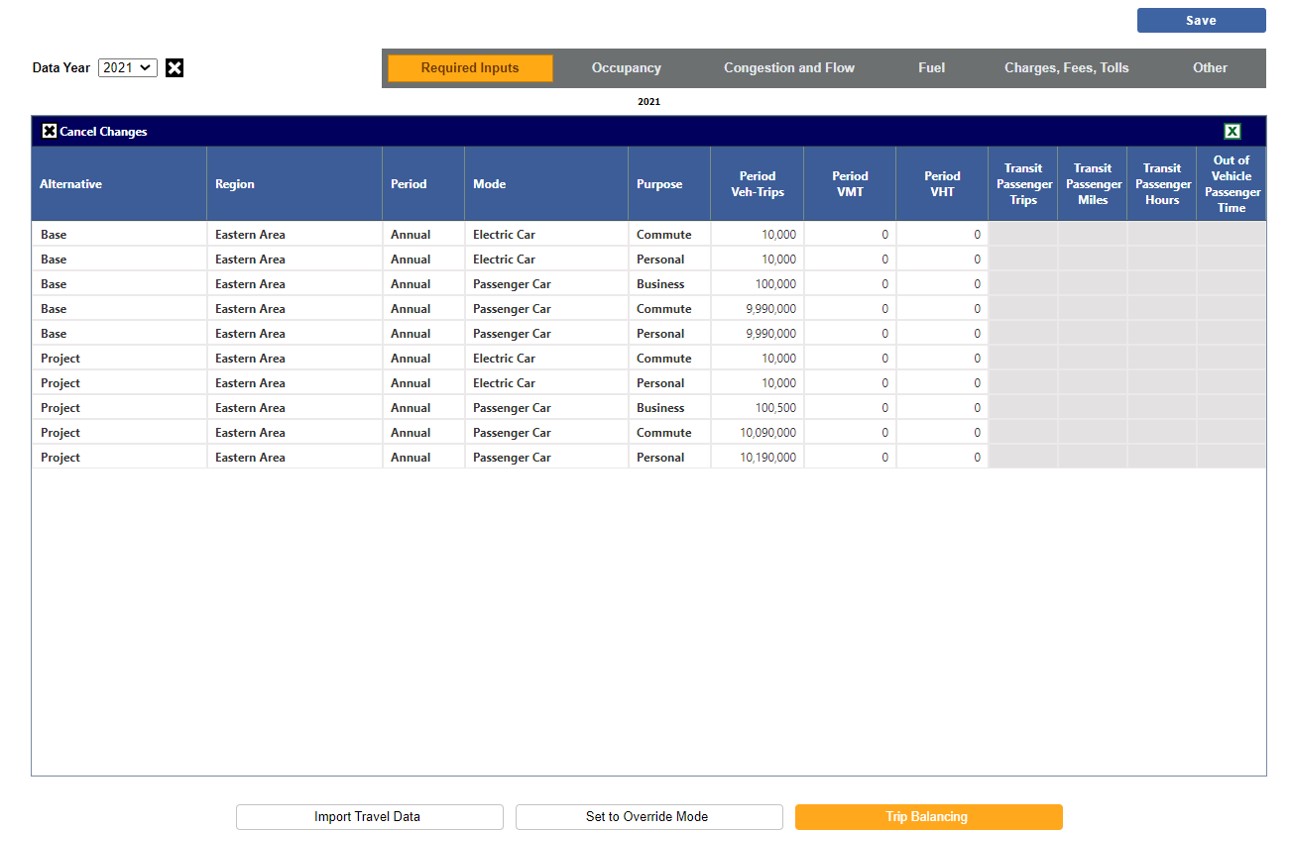
In the figure, the number of Business trips rises from the Base alternative to the Project alternative by a total of 500. Dividing by the number of Base alternative Business trips, TREDIS finds a 0.5 percent increase (500/10,000). Though there are two modes used for Commute – Electric Car and Passenger Car – they are considered together for purposes of Commute travel, which in total rises 1 percent (change in total commute trips divided by over total commute trips in Base alternative, or 100,000/10,000,000), while total Personal travel has risen by 2 percent.
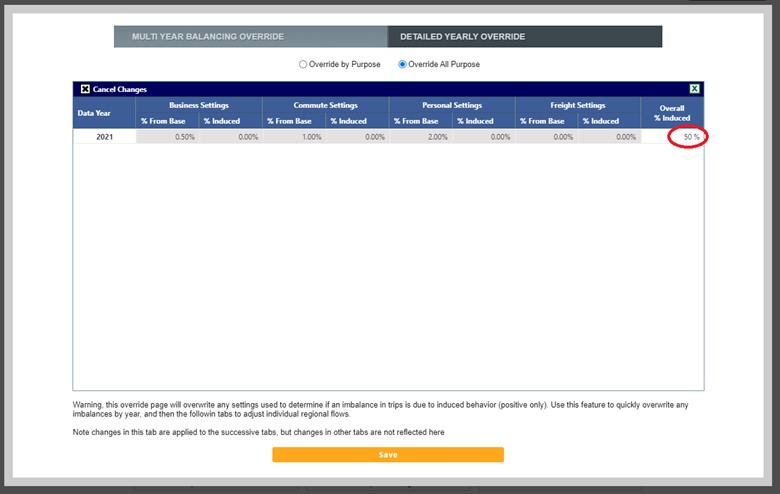
In the figure below, the "50%" in the Overall % Induced column has been entered by the user to indicate that half of new traffic – any increase, regardless of purpose – is considered induced. This will be applied to each of the four modes shown in the other columns during Run Results.
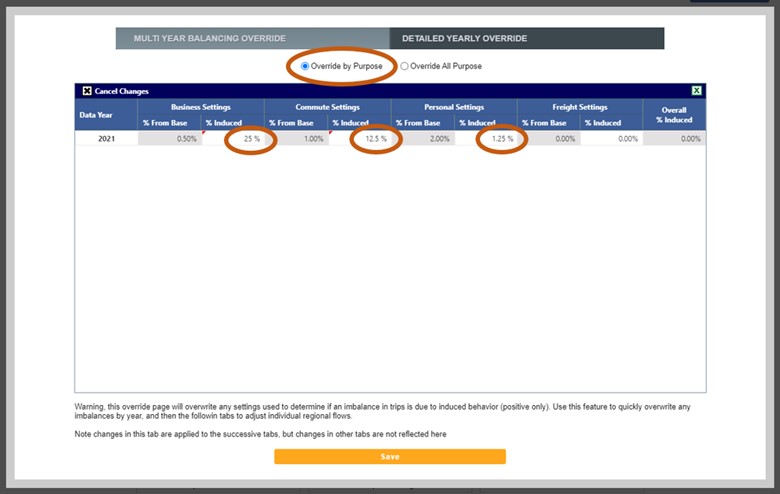
In the next figure, by toggling to Override by Purpose using the radio button at the top of the page, the induced percentage can be set separately by year for each purpose (Business, Commute, Personal, and Freight), though in this case there is only 1 year.
By clicking on the Detailed Yearly Override tab, you may reach the screen in the next figure showing the System Wide Imbalance table to see differences by region and period.
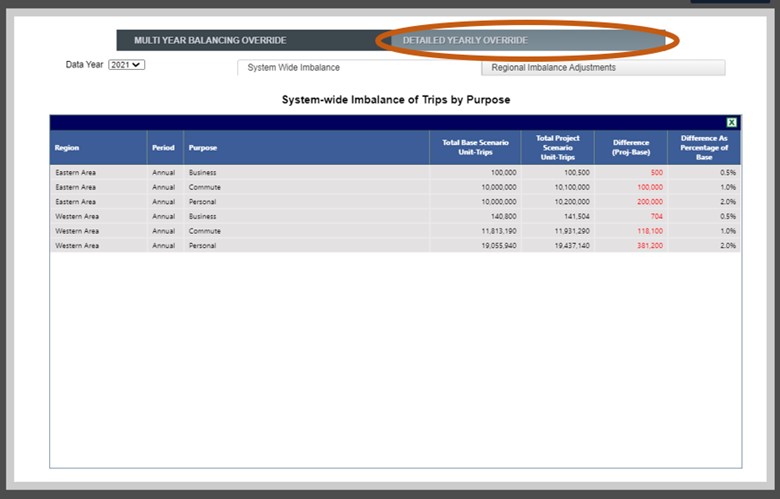
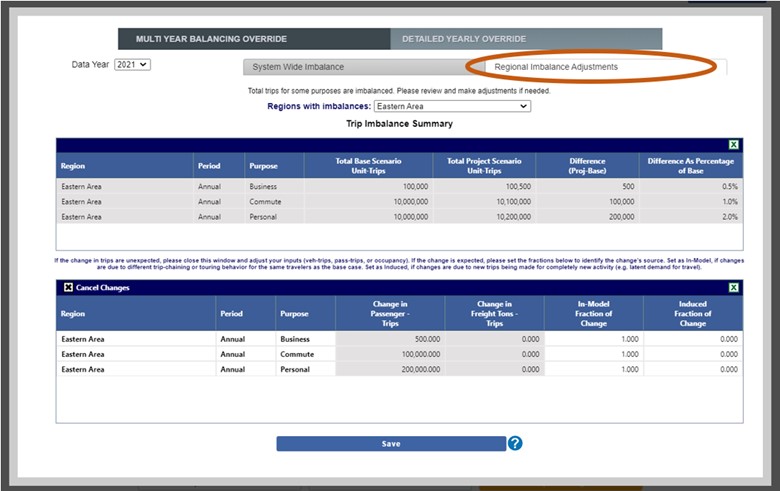
Finally, in this last figure, the Regional Imbalance Adjustments subtab opens a table where the percentage of induced activity can be set by purpose, by year, by region and by period (the most granular input structure).