Safety Incident Counts
On the Other tab in the main grid of Travel inputs, users have the option of entering the rates of incidents (fatalities, injuries and crashes) per 100 vehicle miles travelled. There is an alternate way to enter directly these not as rates but as simple counts.
To access this view, complete all other data inputs on the Travel page, including entering data for each year you have it for. This ensures that the Safety Incident Counts window will allow you to enter incident counts for those years.
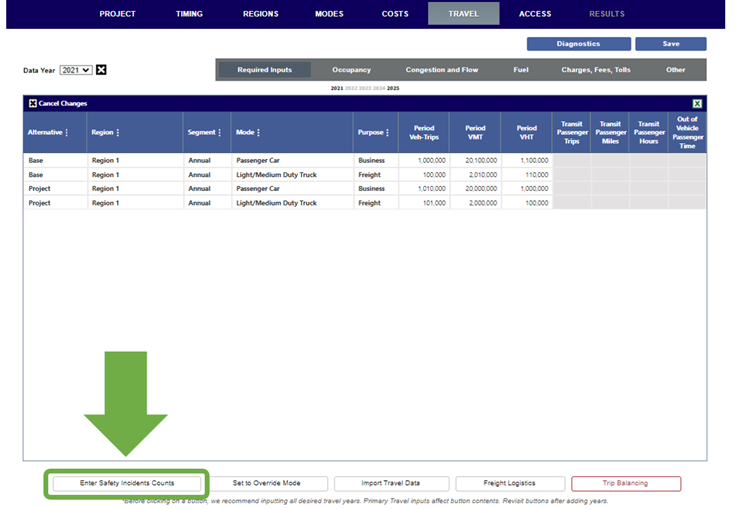
To open the window, click the Enter Safety Incident Counts button.
Basic Safety Incident Counts
On the resulting Basic Safety Incidents Counts window, you can enter incident counts for KABCO severity of fatalities (or "K") and injuries ("A", "B", "C", and "O") where severity counts are known, for each alternative, region, and segment combination. Additionally, you may enter counts for severity "U" when injuries are estimated or observed but where the severity is unknown.
Depending on how you have set the Crash Entry Method in the Preferences window, either the Crash-Involved Vehicles or Crashes column will be available for input.
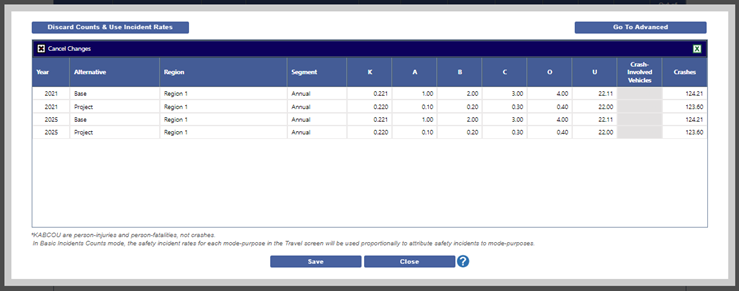
After clicking Save for any data entered, clicking the Go To Advanced button will take this data and attribute data to specific mode-purpose combinations and open the Advanced Safety Incidents Counts window.
Clicking Discard Counts and Use Incident Rates will discard the data entirely.
If you simply click Close, you will return to the Travel page and the project will use these Basic Incident Safety Counts unless you return to this window and click Discard Counts or Go To Advanced.
Advanced Safety Incident Counts
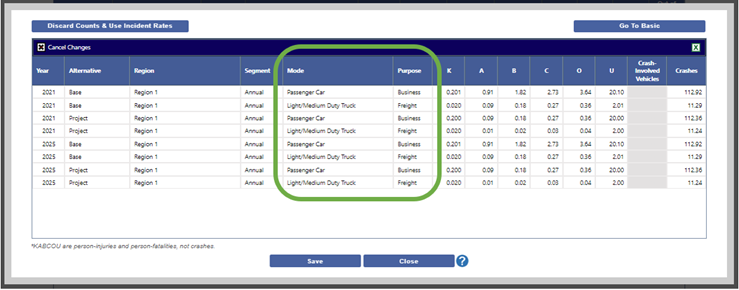
The Advanced Safety Incident Counts window is very similar to the Basic Safety Incident Counts window, but allows you to adjust counts for individual mode-purpose combinations where they are known. When first deployed, the window will pre-populate the counts based on any data entered in the Basic Safety Incident Counts window and the underlying Incident Rates that are given on the Travel page.
After clicking Save for any data entered, clicking the Go To Basic button to discard any Advanced Data entered and return to using the Basic Safety Incident Counts view.
Clicking Discard Counts and Use Incident Rates will discard the data for both Basic and Advanced and return to using the default incident rates provided in the Travel page.
If you simply click Close, you will return to the Travel page and the project will use these Advanced Incident Safety Counts unless you return to this window and click Discard Counts or Go To Basic.