Occupancy
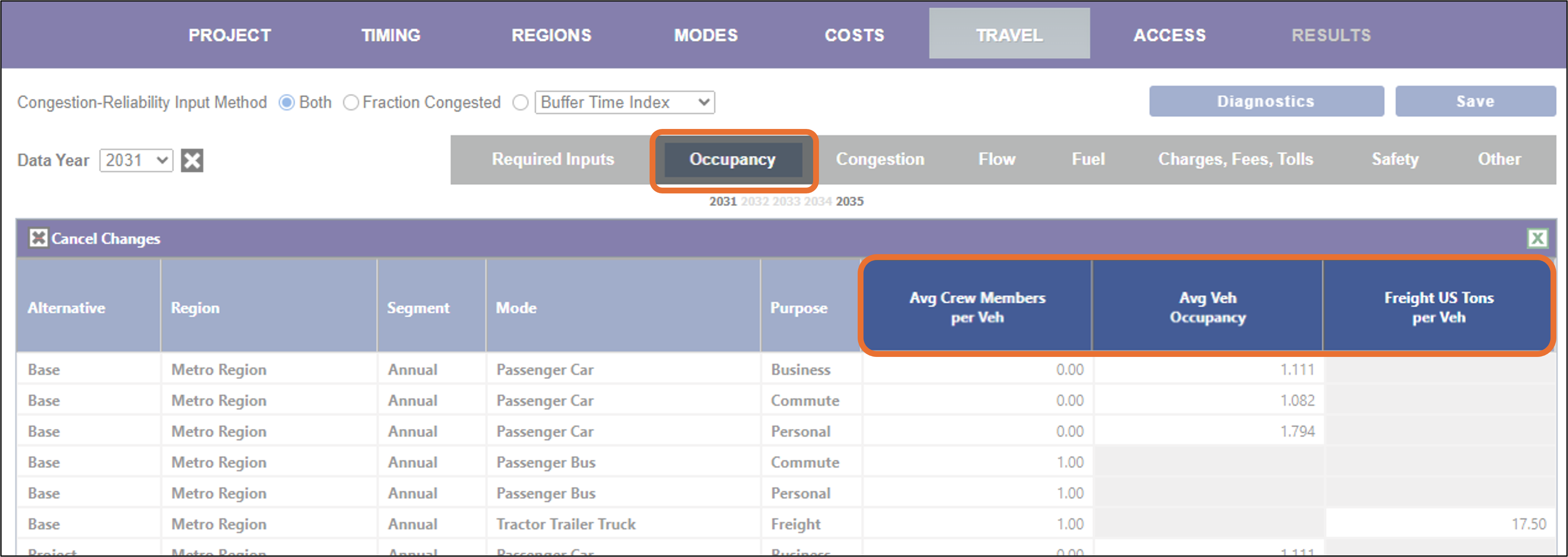
The Occupancy tab allows you to view and/or change the number of crew and passengers per vehicle as well as the freight capacities of modes that carry freight.
In the case of transit modes (bus and passenger rail for example), the average passenger occupancy rates are calculated from the values entered in the Required Inputs tab for vehicles and passengers, and may not be changed here. All values are initially set to the default values.
Note that you may only enter or update the values in those fields that are not gray.
Data Fields
-
Avg Crew Members per Veh. The average number of crew members per vehicle per trip. This has a default set at the mode-purpose level but can be changed by the user.
-
Avg Vehicle Occupancy. The average number of passengers (including the driver) per trip. For transit modes, such as passenger bus or rail, the value is calculated from the values on the Required Inputs tab as the ratio of Transit Passenger Trips/Period Veh-Trips. For freight modes, the field is not applicable and grayed out.
-
Freight US Tons per Veh. The average number of US tons per vehicle per trip. This may be in a different unit if you are not using TREDIS in the US. For non-freight carrying modes, the field is not applicable and grayed out.