Tracing/Validation Reports
Tracing/Validation reports are designed to support understanding and tracing of TREDIS results to better understand the results reflected in the Benefit-Cost, Economic Impact, and other report suites.
Many report under the Tracing/Validation tab provide filter controls using dropdown menus:
-
Economic Activity adjusts the results view to look at the comparison between project versus base, the base results, or the project results.
-
Periods filters your results for specific periods from your analysis as set on the Timing page.
-
Segments filters results by the travel segments defined on the Timing page.
-
Industry Aggregation adjusts the industry details viewed in the results. The larger the number of sectors the longer the report. It is recommended to use the smallest value first and then change the settings as desired to zoom in on the industry detail desired. |
-
Impact Type filters the results by source of impact (or total): construction, O&M, operations, contingent development, or market access.
Not all controls are available on each report.
Graphics
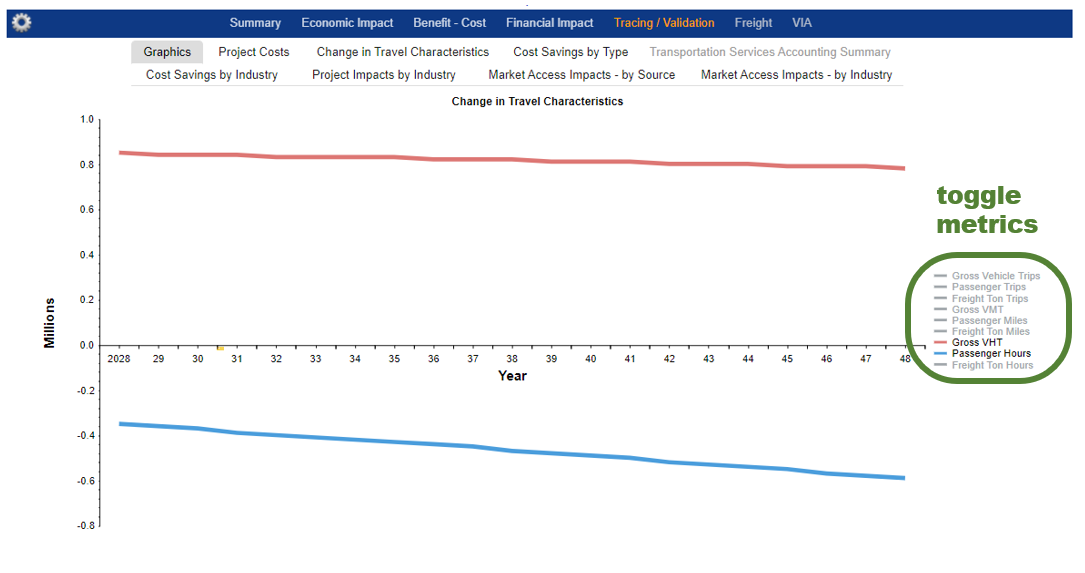
The Graphics tab shows a summary of the travel changes in your project. Click on a metric in the legend to toggle it on or off.
In the following descriptions, the cost savings in the variable described are reported, not the level itself. So, for example, the Crew Cost line item doesn’t describe the costs of the crew in the Base or Project alternative. The Crew Cost line item is the difference (Base minus Project) between the two alternatives.
Overview of Travel
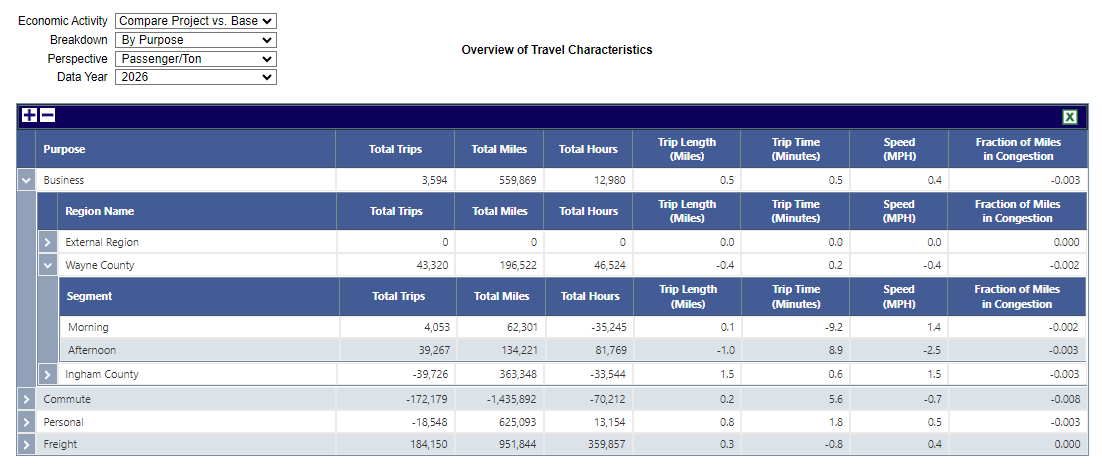
The Overview of Travel report shows primary measures of performance, including miles per trip, minutes per trip, speed, and fraction of miles traveled in congestion.
The dropdown controls at the top left include a Breakdown and a Perspective dropdown. The Breakdown options include By Purpose and By Mode, while the Perspective options include Vehicle or Passenger/Ton Changes in performance metrics between the Base and Project scenarios by year.
Change in Project Costs
The Change in Project Costs shows calculated differences between project costs by facility type, year, and subcategory of cost.
Change in Travel Characteristics
The Change in Travel Characteristics report shows performance metrics.
Clicking on a year expands the table to show the changes in travel characteristics for each mode-purpose combination for that year. This report is helpful to verify that you have entered in your travel data correctly.
Positive numbers indicate savings in trips, mileage, or time saved. That is, the level of the Project alternative is less than the level of the Base alternative. Negative numbers in this report indicate dissavings of these, i.e., an increase in activity.
Cost Savings by Type
Cost savings by mode-purpose combination and type.
To see how the cost savings are allocated across each cost category, click on a specific year. In this expanded view, you can which cost elements are the primary sources of savings in the selected year.
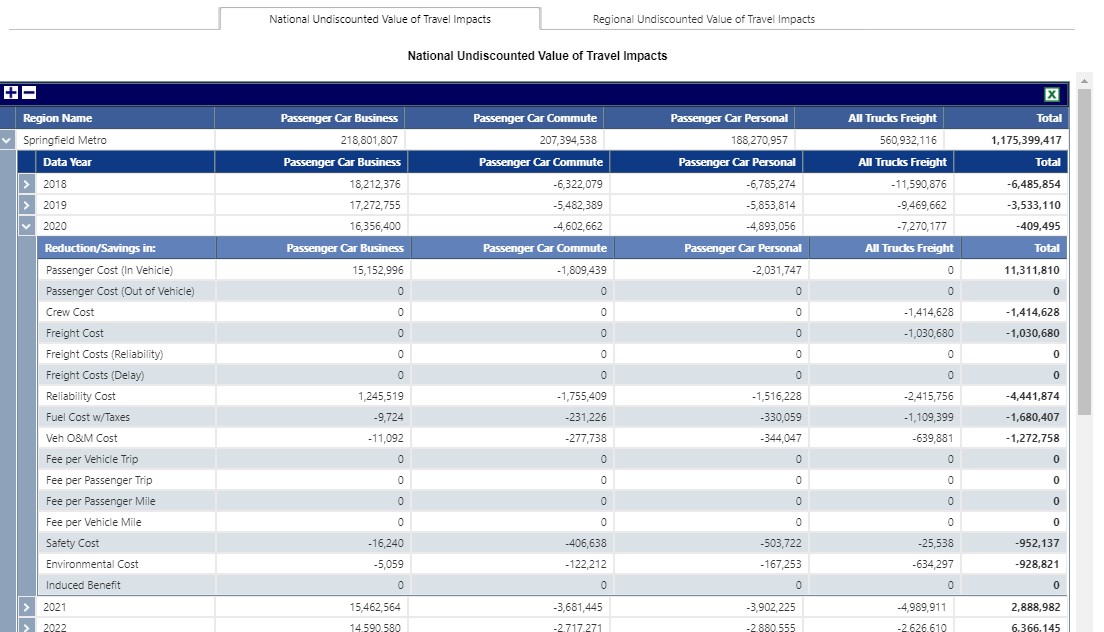
Passenger Cost (In Vehicle). Value of time of passengers for time spent in a vehicle.
Passenger Cost (Out of Vehicle). Value of time of passengers for time spent outside the vehicle.
Crew Cost. Value of time for drivers or other vehicle crew.
Freight Cost. Cost of freight goods being transported. This field is deprecated and set to 0 for results run as of March 2021; for projects run previously, it will maintain the previous cost estimated until the project has results run again.
Freight Cost (Reliability). Costs due to addressing unreliability in goods movements that are passed on to shippers and receivers of freight.
Freight Cost (Delay). Costs due to delay in delivery of goods that is passed on to shippers and receivers of freight.
Reliability Cost. Value of time for passengers and crew spent buffering trips in order to arrive on time under unreliability circumstances.
Fuel Cost w/Taxes. Costs, including taxes, of fuel.
Veh O&M Cost. Operations and maintenance costs of vehicles, not including fuel.
Fee per Vehicle Trip. Charges and‐ fees incurred on a trip basis (e.g., road tolls, parking).
Fee per Passenger Trip. Charges and fees incurred on a passenger trip basis (e.g., transit or taxi fares).
Fee per Passenger Mile. Charges and fees incurred on a passenger mile basis (e.g., transit or taxi fares).
Fee per Vehicle Mile. Charges and fees incurred on a vehicle mile basis (e.g., mileage-based fees).
Safety Cost. Societal benefits (or disbenefits) from averted fatalities, injuries, and property damage.
Environmental Cost. Societal benefits (or disbenefits) from averted emissions, including GHGs.
Note that the Safety Cost reported here is a societal benefit, and not the same figure as the Safety impacts reported on the Project Impacts by Industry report. (Those are completely economic benefits and are calculated in a separate procedure.)
Cost Savings by Industry
Savings (as shown in Costs Savings by Type) by industry and special aggregate groups (e.g., household).
Positive numbers indicate savings in dollars or time valued in dollars. That is, the level of the Project alternative is less than the level of the Base alternative. Negative numbers in this report indicate dissavings of these, i.e., an increase in money spent (or time valued in dollars).
The bulk of the line items in this report show how savings go to specific industries, defined by NAICS code.
- If you choose the highest degree of detail in the Industry Aggregation dropdown, reporting will not correspond directly to a NAICS code.
- Non-industry sectors defined by IMPLAN have descriptions beginning with“Not an Industry”.
- Government sectors defined by IMPLAN have descriptions beginning “Employment and payroll of…”.
- Household Value of Time Benefit is time savings, monetized.
- Societal & Environmental Benefits are monetized.
- Transit Operating Expenses are not used in the benefit-cost analysis or economic model because they are typically assumed to be entered as spending input on the Costs page.
Project Impacts by Industry
Savings here serve as inputs into the economic model and reflected, finally, in the Economic Impact reports (Results page on the Economic Impact tab).
Positive numbers indicate savings in dollars or time valued in dollars. That is, the level of the Project alternative is less than the level of the Base alternative. Negative numbers in this report indicate dissavings of these, i.e., an increase in money spent (or time valued in dollars).
Impacts are summarized by columns describing their source. based on four categories of potential impact sources.
Travel Cost Savings are produced by changes between Base and Project alternatives entered on the Travel page. These might include savings for households and industries through a variety of mechanisms including savings of time on business travel, fuel, and vehicle operating costs. These do not include economic impacts of averted crashes, fatalities, and injuries, which are tallied under the Safety column.
Contingent Development impacts are produced directly by items entered on the Contingent Development tab of the Access page. These represent impacts that might accrue due to considerations outside of a travel model, such as the establishment of a new business venture due to improved travel.
Additional Potential Output from Market Access comes from the Intercity Access tab of the Access page. These include productivity improvements stemming from enhanced employment opportunities, business-to-business opportunities, and port efficiency.
Safety impacts are produced by improved economic outcomes from averted fatalities, injuries, and property damage, including reallocation of medical care costs back to payees (both firms and households), lost productivity due to injury, and insurance costs. Impacts listed here are for economic impact purposes and not for societal benefit calculations â€" those figures are shown in the Cost Savings by Type report.
Reallocated items represent a shift of dollars, so there will be an equivalent direct effect of the opposite sign in the economic impact model, leading net impacts to only depend on the different industry mixes of the positive and negative effects and the characteristics of those industries in the regional economy. Not Reallocated items do not represent a shift of dollars, but a single shock with no balancing direct impact of the opposite sign. Because there is no balancing direct effect going into the economic impact model, the effect will be roughly the amount reported plus the effects of the economic simulation.
Driver Budget (Not Reallocated) represents the net to the drivers of TNCs. This is the same as the Driver Income line from the Transportation Services Accounting Summary report.
Household Budget (Reallocated) represents the net to the Household sector, with money reallocated to other sectors to where spending will occur in the economic model. These typically include vehicle operating costs and fuel costs for private travel (or half of commute travel).
Household Budget (Not Reallocated) represents the net to the Household sector, with money not reallocated to other sectors in the economic model, typically because the money is collected by an agency.
Transit Operating Expenses represents the net change of spending on operating transit. These figures are not used in the economic model because they are typically assumed to be entered (and impacts determined) by spending input on the Costs page.
Market Access Impacts by Source
Impacts of the market access impacts, tracing the effects of inputs on the Access page, Intercity Access tab.
The Access Characteristics Summary shows how the inputs are transformed into single metrics expected by the estimation functions and shows the difference between the Base and Project alternatives as a percentage.
To calculate the compound metrics, decay factors are used to weight the population or employment in each band — that is, the additional quantity present in a larger region relative to the next smaller input quantity. For example, if the population within 40 minutes is 1,000,000 and the population within 60 minutes is 1,200,000, the population in the 40-60 minutes band is 200,000.
Local Market (population) is a weighted average of the population bands given in the Access page to represent consumer and labor markets. The measure is:
100% of pop within 40 minutes + 40% of pop 40-60 minutes
Regional Same Day Market (employment) is a metric reflecting improved access to same-day freight deliveries and business relationships. The metric is a ratio where a weighted average of the employment bands is the numerator and the employment within one hour of the county center is the denominator:
(100% of 1- to 2-hr employment + 85% of 2- to 3-hr employment + 15% of 3- to 4-hr employment) / 0- to 1-hr employment
A separate ratio using the population inputs is used to calculate access to population that affects visitor services industries.
Gross Business Attraction from Market Access Improvement shows nominal dollar impacts, broken down by source of market access impact for the last year of operations modeled. These changes are split between productivity changes and business attraction (as higher local productivity leads to relocation of business from other locations).
Market Access Impacts by Industry
These represent direct economic impacts from the section on Gross Business Attraction from Market Access Improvement in the Market Access Impacts by Source report, spread across all operations years and broken down by industry.
Impacts depend on the industry mix and scale for the County of Focus for each Region modeled, not for the entire Region.
Intercity Access impacts phase in over time as the local economy reacts to accessibility changes. This leads to much smaller impacts in early operation years.
Transportation Services Accounting Summary
Accounting for revenues, costs, and driver income for TNC modes.
In the example below, TNC operations are expected to collect $200,000 more in the Project alternative than in the Base alternative.
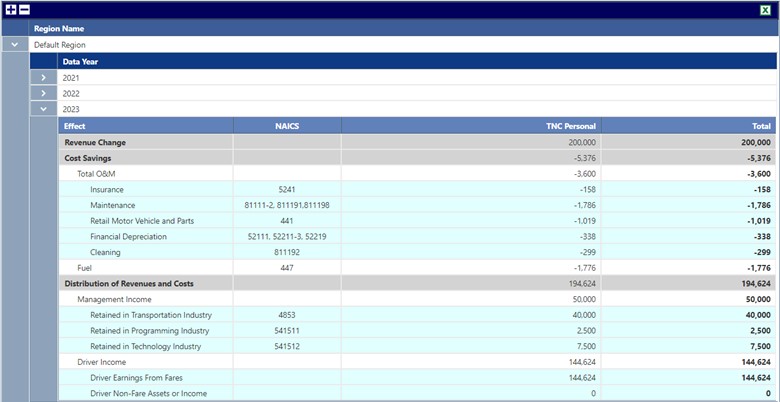
Of the $200,000, TNC management takes 25% of gross revenues, or $50,000 of revenues. Operating costs ($5,376) are then subtracted from the remainder, and finally Driver Income (via Driver Earnings from Fares) is what remains after operating costs. If the driver is operating at a personal loss for any reason, the improvement or worsening loss of this personal is shown in the line Driver Non-Fare Assets or Income, until the driver is no longer losing money by driving, after which it is reflected in income.
Results from this report inform the Costs Savings by Industry and Project Impacts by Industry reports. Total revenues to drivers and TNC companies are taken out of household or employer budgets.
- This report is only available if a TNC mode has been selected (on the Modes page ).
- The Company Share field (which determines share of revenues going to management company) is set in Modes page via the Adjust Mode Factors window (on the Other Costs tab).
- TNC charges can be entered as Per Passenger Mile charges or Per Passenger Trip charges in the Travel page on the Charges, Tolls, Fees tab.