2023-11 Safety Count Inputs
Safety Count Inputs and Enhanced Safety Categories
Safety Outcome Count Inputs
The TREDIS team has added two new TREDIS interfaces that allow users to enter counts of fatalities, injuries and crashes. Entry of rates for fatalities, injuries, and crash-involved vehicles – e.g. the number of fatalities per 100 million VMT – is still possible, and TREDIS defaults to using those rates, but users now have the option of entering the expected number of fatalities, injuries, and crash-involved vehicles directly as counts.
The new features have been developed in collaboration with Michigan DOT and were funded by the State of Michigan. A brief outline of the new features follows; consult the TREDIS User Manual for a more detailed explanation of the input options.
From the Travel page, clicking the Enter Safety Incidents Counts button at the bottom of the page will launch a new interface, the Basic Incident Counts window.
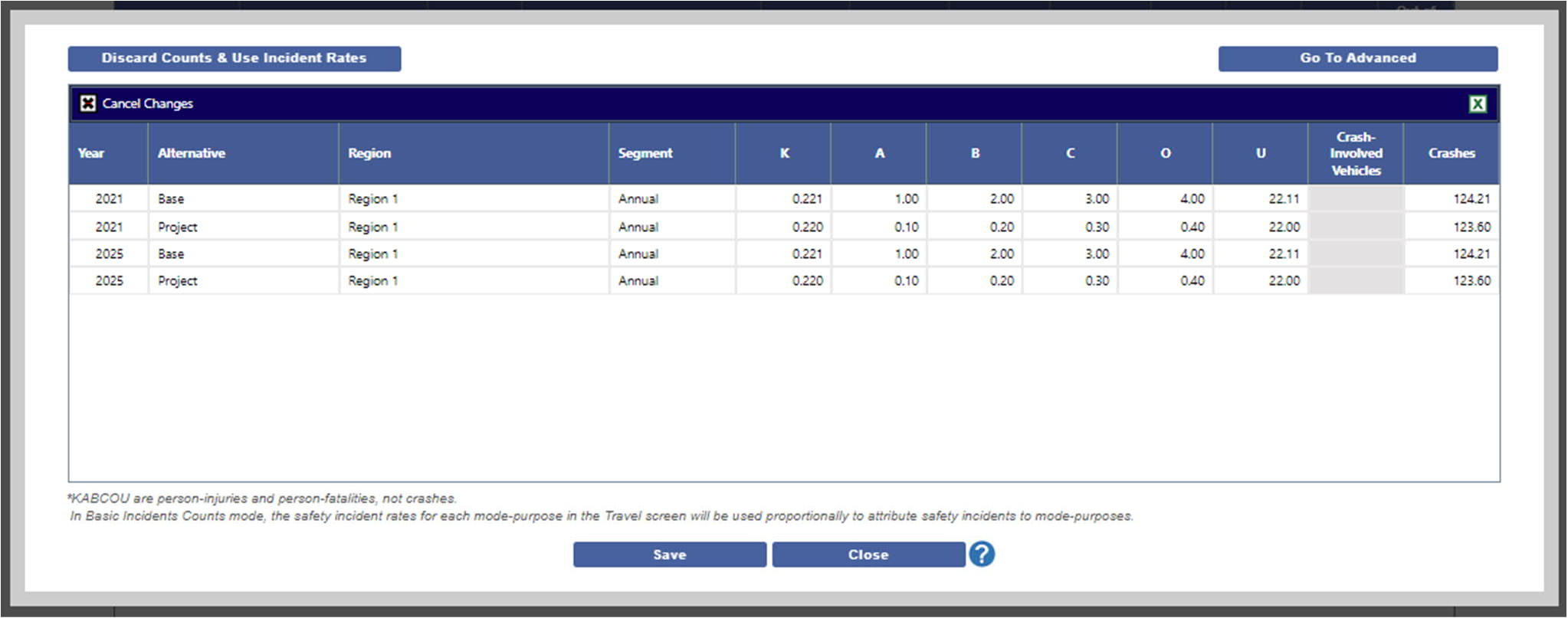
The Basic version of the interface only asks for incident counts by Region and Segment, so it is useful when you do not have the appropriate data to attribute fatalities, injuries, or crash-involved vehicle counts to specific modes.
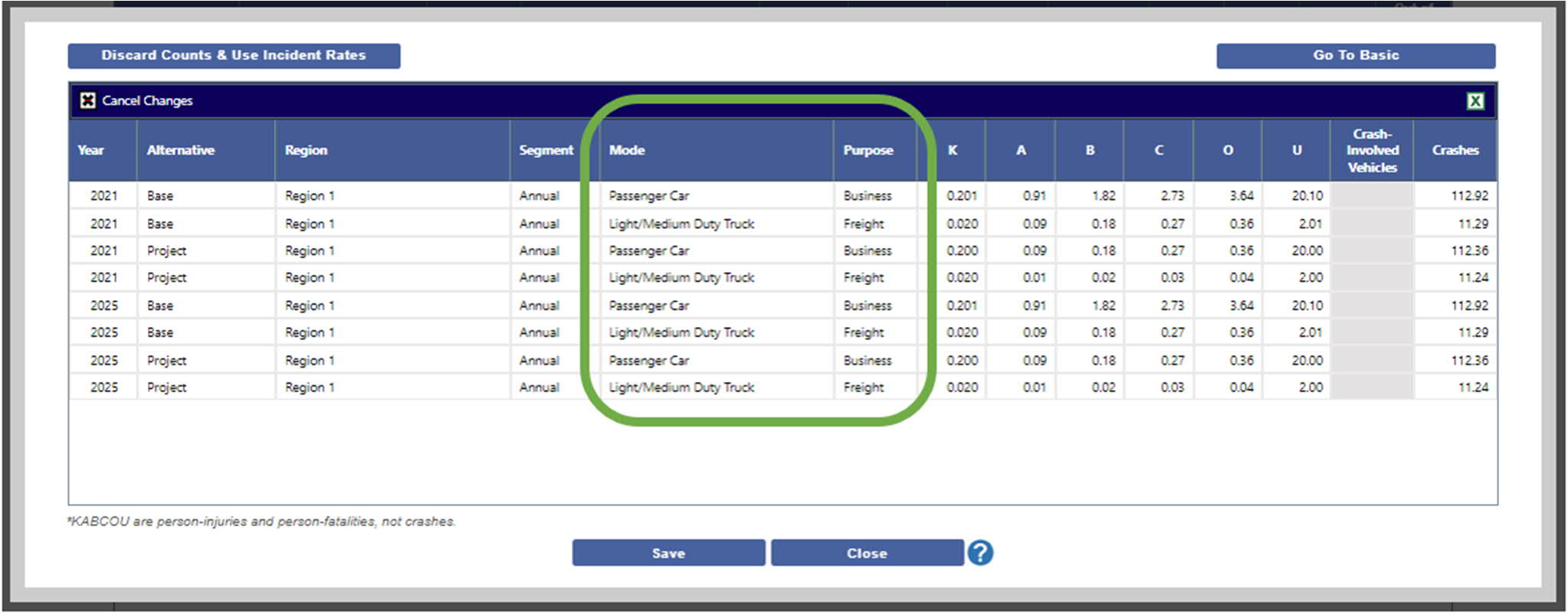
Clicking on the Go To Advanced button will launch the Advanced Incident Counts window, where specific counts of incidents can be attributed to specific mode-purpose combinations. This is the level of detail used by societal benefit and economic impact calculations. The Advanced screen will automatically populate based on Basic and Rates inputs, but you may make subsequent adjustments if needed. (Concurrent with this release, we have added economic impacts stemming from crashes to the Economic Impact Analysis model; see the Safety Impacts Release Note.)
Enhanced Safety Categories
Inputs by Injury Severity
In addition to the existing estimates of injuries of unknown severity, users may now differentiate between injury severities when entering safety data. To take advantage of this, they can use one of the Safety Incident Counts interfaces described above to enter counts of injuries for each level of injury -- A, B, C, and O. Users may still enter data for unknown injuries, which are now labeled U to differentiate them from injuries of a known severity (A, B, C, or O).
Inputs for Crashes
Users may now choose to enter data on crashes as an alternative to entering data on crash-involved vehicles. We have updated the existing data input grid (on the Other tab in the Travel page) to include a column Crashes per 100m VMT, and the new Safety Incident Counts interfaces include input columns for Crashes as well as Crash-Involved Vehicles. To convert between the two, a Vehicles per Crash factor has been added to modes as a fixed factor.
Users can choose to enter one or the other metric by accessing the Preferences window (via the Navigation Menu at the top right of the TREDIS application window). The two are mutually exclusive but users may switch their preferences at any time.
Updated Import Spreadsheet
A new version of the TREDIS import spreadsheet is now available, and on the Project tab a new column indicates whether a project uses INCIDENT RATES, BASIC, or ADVANCED as the safety mode. New sheets for Basic and Advanced Incident Counts are now optional, and mode factors for the value of each injury severity and the number of vehicles per crash are now included.