2026-02 Reliability Options
Reliability in TREDIS has historically been tracked on a "Buffer Hours per Trip" basis. Users now have the option to provide "Total Buffer Hours" or a "Buffer Time Index" (BTI) directly, and choose which to enter for each TREDIS project individually.
Background
TREDIS has long supported analysis that takes into account both congestion and reliability, where "congestion" refers to the miles traveled on segments that have a high ratio of volume to capacity, and "reliability," or "buffer time," refers to the extra time users add to their trips in order to arrive on time 95% of the time. Congestion in TREDIS is entered as a fraction of miles traveled, and reliability has been entered as a number of hours added to each trip.
Literature generally agrees that the value of travel time reliability improvements can be considered one-times (1x) the value of travel time savings. In some cases, it is lower, and in some cases, it is much higher. Generally, however, both households and businesses have a strong preference for reliable travel rather than having to arrive early on a regular basis to avoid that late arrival. Buffer time affects passengers, crew, and freight costs in TREDIS.
Use Cases for New Options
With this update, TREDIS users have two additional options for entering reliability metrics, allowing them to choose the option that best matches their data workflow. The new options for reliability are "Total Buffer Hours" and "Buffer Time Index" (BTI).
An example workflow might make use of the reliability products from the SHRP2 program and the congested network data from a travel demand model. If the total buffer hours by mode and purpose are available, there is no longer any need to adjust this metric based on trip counts from trip tables, since the buffer hours can be entered directly.
Alternatively, the BTI metric may be used for easier scenario testing and sketch evaluations in TREDIS. BTI might be developed from real-time data from vendors or the NPMRDS dataset. Fractional improvements (by mode and purpose) can be entered directly into TREDIS.
Along with the new options, TREDIS has also improved tracking of each individual project's reliability metric preferences -- both in the user interface and in the back-up and import spreadsheet.
As before, when the user chooses to provide only reliability or congestion data, the other measure is imputed without further effort.
Setting the Reliability Entry Method
In TREDIS, on the Travel page, congestion and reliability metrics now have their own sub-tab, labeled "Congestion."
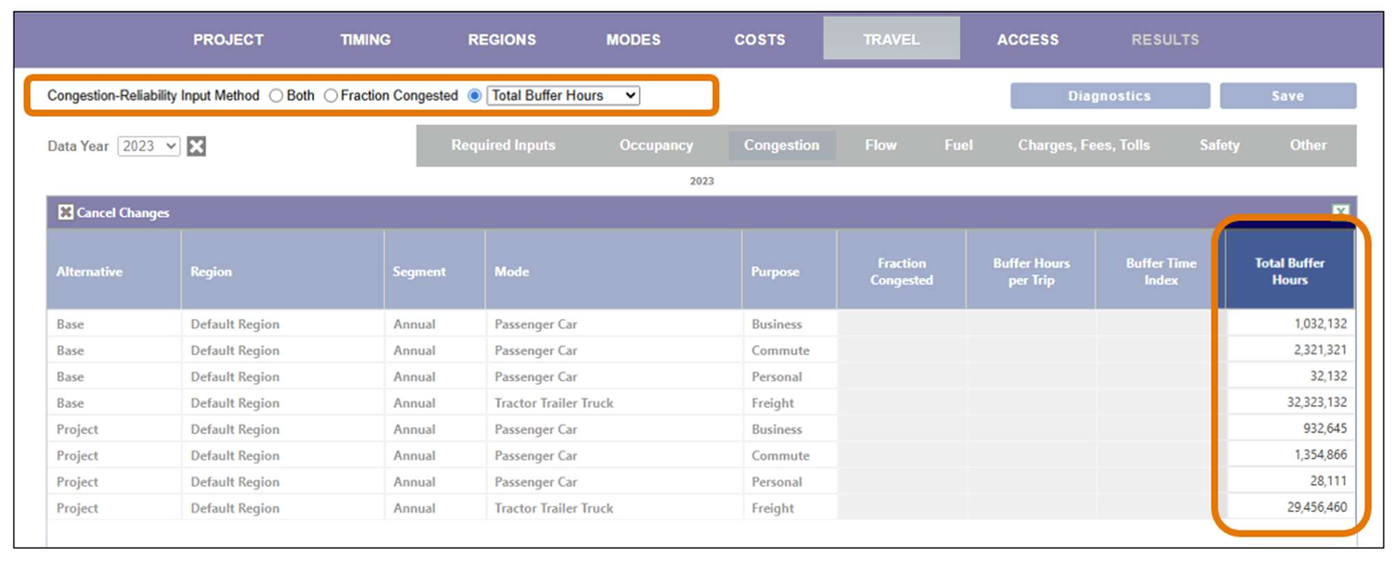
On this tab, the columns are Fraction Congested, Buffer Hours per Trip, Buffer Time Index, and Total Buffer Hours.
The Congestion-Reliability Input Method has radio buttons and a dropdown, as shown in Figure 1. Use the radio buttons to select Both, Fraction Congested, or a reliability metric. This works very similarly to how it has before, where choosing Fraction Congested or a reliability metric means the other measure will be imputed from the data you provide and choosing Both means you will directly provide both.
Figure 1. Travel Page with Congestion-Reliability Preferences
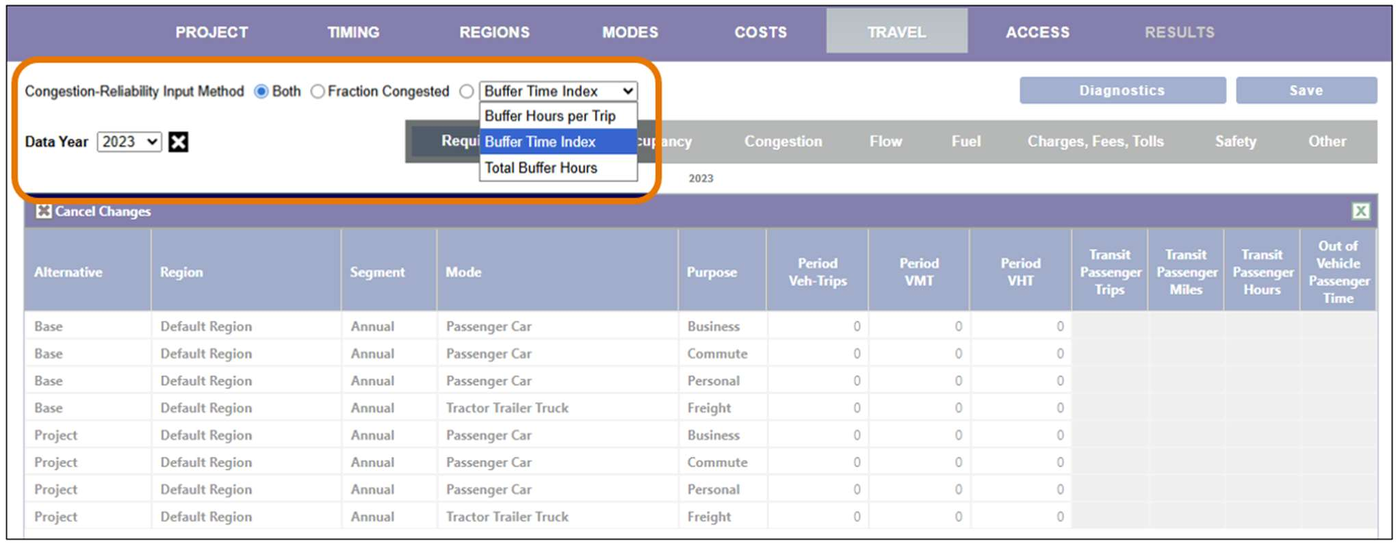
In practical terms, this means that if you choose Fraction Congested here as the Congestion-Reliability Input Method, you will only be able to enter data in the Fraction Congested column in the matrix below, and the buffer hours that travelers add to their trips will be estimated based on the congestion. Likewise, if you select the third radio button and select Total Buffer Hours, TREDIS will only allow data entry in that column, and will later impute the fraction congested when performing the analysis. This option can be seen in Figure 2.
Figure 2. Travel > Congestion Page with Total Buffer Hours Chosen
Finally, selecting Both will mean TREDIS expects you to enter both the Fraction Congested and whichever reliability metric is selected. Anything not entered will be 0 by default.
After changing the Congestion-Reliability Input Method, the variables you can no longer enter will be greyed out in the entry matrix, the Save button will toggle to red to indicate there are unsaved changes. When you click Save, the stored values for the variable being imputed will be calculated based on your preferred variable, overwriting any previous values input when your preferences were set to Both.
When switching between reliability metrics, TREDIS automatically recalculates the appropriate values to be the equivalent of any data already entered.
Relationship of Variables
The primary variable for TREDIS calculations is now "Total Buffer Hours." This is the cumulative amount of schedule time added by travelers in your analysis to prevent late arrivals 95% of the time. This metric is chosen as a basis for analysis because it simplifies calculations and extrapolation (when TREDIS extrapolates between years of data provided). This is especially true when the user does not want to provide trip count estimates.
The relationships between "Total Buffer Hours," "Buffer Time per Trip," and "Buffer Time Index" are defined as straightforward algebra, now performed by TREDIS where it would have previously been required of the user:
Buffer Hours per Trip * Vehicle Trips = Total Buffer Hours
Buffer Time Index * Vehicle Hours Traveled = Total Buffer Hours
User Preferences and Default Settings for Projects
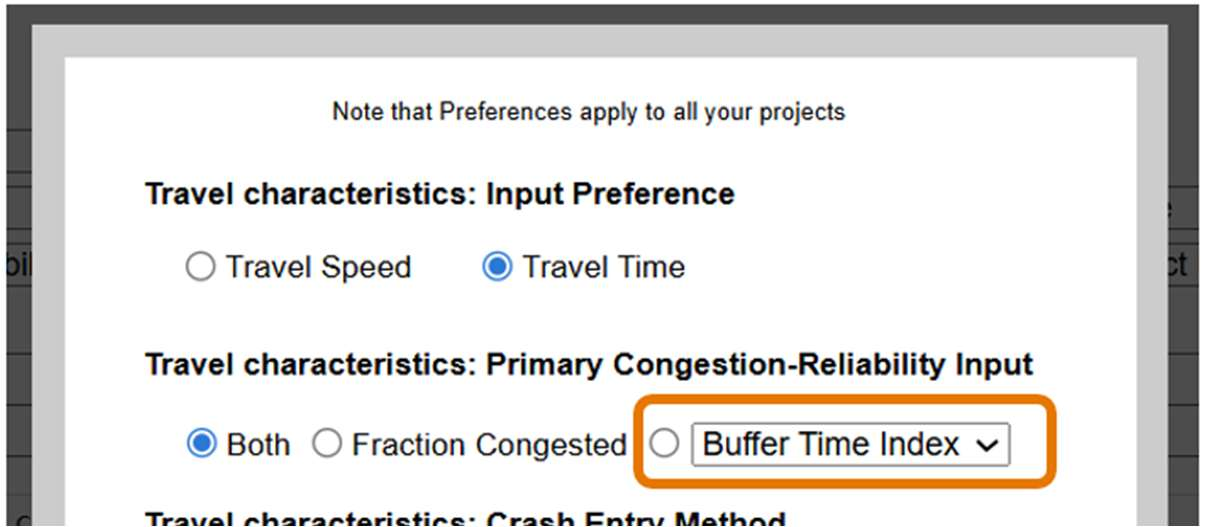
User Preferences has been updated to include a dropdown for the reliability metric, as in Figure 3.
Any new projects created on or after February 17, 2026 will have their Congestion-Reliability Input Method and Reliability Metric set to the method and preference indicated by User Preferences. These can be changed by using the radio buttons and dropdown on the Travel page.
Any projects created prior to February 17th, 2026 will have their Congestion-Reliability Input Method set depending on their User Preferences (where the reliability metric is always "Buffer Hours per Trip" since that was the only metric available before).
Figure 3. User Preferences - Reliability Metric Preference
Backing Up and Importing Settings
The TREDIS Import Spreadsheet represents the current best practice for importing data into TREDIS, as well as the format that will be exported (as of this release) when users back up their projects.
The TREDIS Import Spreadsheet now has two new columns appended on the far right of the Project sheet.
- Congestion-Reliability Input Method
- Reliability Metric Preference
These reflect the selections via radio button (Congestion-Reliability Input Method) and the dropdown (Reliability Metric Preference) indicated on the Travel > Congestion page.
Because the Congestion-Reliability Input Method is now set for each TREDIS project, the User Preferences sheet on the Import Spreadsheet no longer needs to include a line for Congestion-Reliability Input Method, and so it is now missing.
Entering Travel
On the Travel Facility Based and Travel O-D Based sheets of the Import Spreadsheet, there is now a column "Reliability Metric (in units given on Project tab)". The meaning of the value on this column depends on the Project it is associated with. If a TREDIS project listed on the Project sheet has "Buffer Hour per Trip" in the "Reliability Metric Preference" column, then the value in the "Reliability Metric Preference" reflects the buffer hours estimated per trip, and it works similarly for "Total Buffer Hours" or "Buffer Time Index." Figure 4 shows the Project spreadsheet with the new columns.
This means, in practice, that you may have values that represent different metrics for different projects.
Figure 4. Import Spreadsheet - Project Sheet

Reverse Compatibility Maintained
Prior v2 formats of the TREDIS Import Spreadsheet are still supported. If your Import Spreadsheet does not include the new project-level reliability and congestion preference settings, the project will be imported using the current User Preferences (as before the format update, and as if you were creating a new project through the user interface).