2026-08 Region-specific Damage Factors
This release introduces county-specific default values for damage factors applied to pollutant emissions. These county values are used to quantify the value of emissions in the user-defined regions. TREDIS previously offered only the national average damage factors from the USDOT Benefit-Cost Analysis Guidance.
This feature builds on the existing ability of users to edit damage factors by year and region, but means users no longer need to bring their own local data.
With the new local data, TREDIS users can now compare projects affecting different parts of their jurisdictions with more nuance and with a better assessment of how emissions variably impact regions based on their local climate and geographic characteristics.
Setting User Preferences
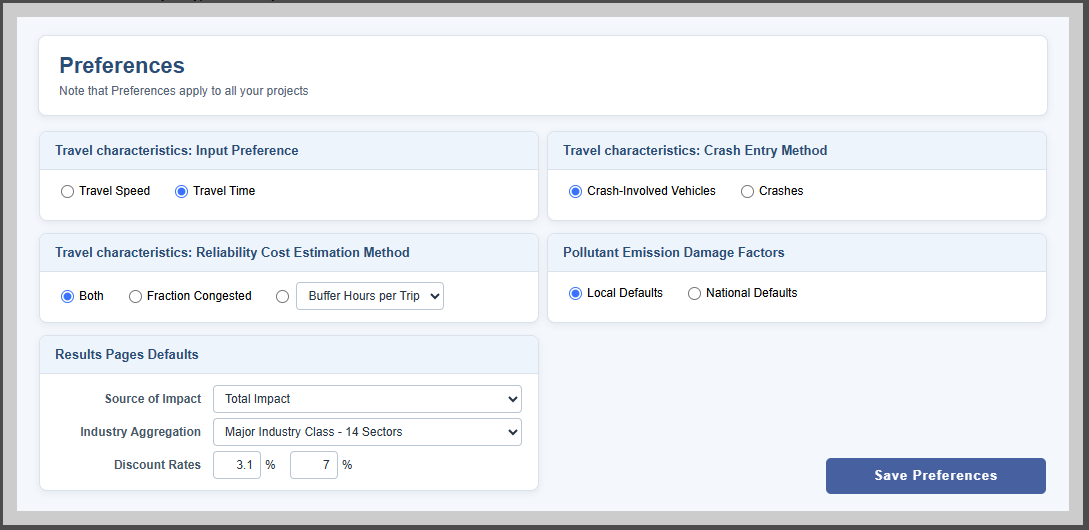
As of this release, all users will default to the Local Defaults option for new projects. This change won't affect existing projects – they will retain their existing emissions values. To change this behavior, navigate to the Preferences window by selecting Preferences from the "hamburger" menu at the top-right of the TREDIS interface. A new control selects how a project's damage factors are populated when creating a new project, as shown in the Pollutant Emissions Damage Factors section of the window shown in Figure 1. Select the National Defaults and click Save Preferences. This will mean that any new projects created will use the national USDOT defaults instead of the localized.
Viewing and Editing Emissions Costs
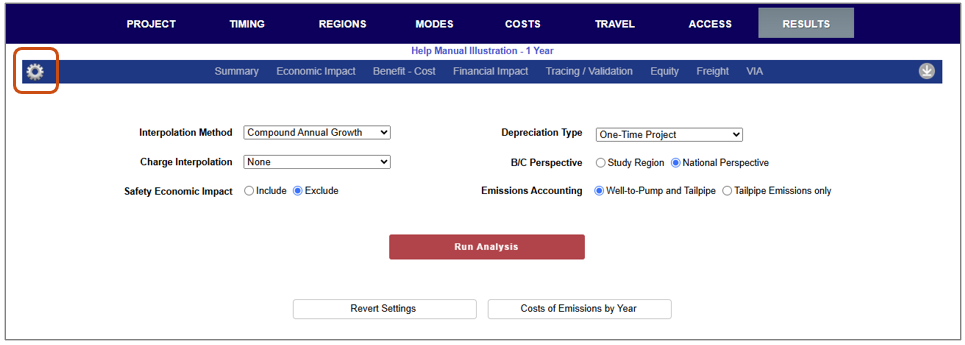
To view or edit emissions costs, navigate to the Results Settings page, shown in Figure 2. When a project is not yet run, going to the Results tab on the top navigation bar of TREDIS will navigate to the Results Settings page. When a project is already run, click on the gear icon on the far right of the results report menu (highlighted with a box in the figure) will show the Results Settings used to run the report.
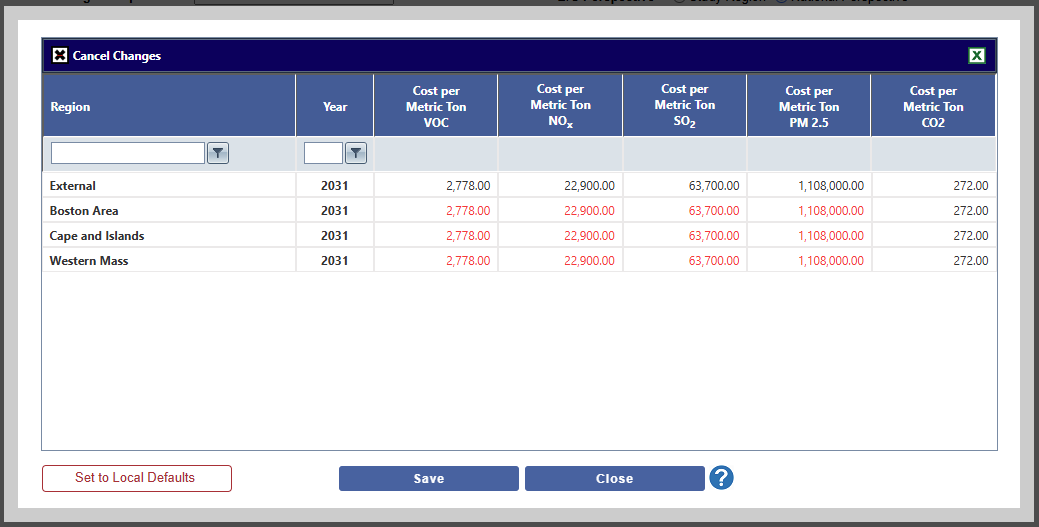
The Cost of Emissions by Year button opens a window, shown in Figure 3 with a case where the Preferences are set to Local Defaults but the project has the national defaults. In this case the national defaults are displayed in red to indicate they don't align with TREDIS's current setting selection of Local Defaults. Clicking the Set to Local Defaults button will set those changed values back to the local defaults and save the data.
When the project is run, the saved values set in the Cost of Emissions by Year window will be used.
Users can switch between local defaults and national defaults by using the Preferences in conjunction with the Costs of Emissions by Year interface without any manual data entry or can enter any other desired cost emissions factors themselves in the grid.
Backing Up and Importing
Since each project has its own cost of emissions factors associated with it, back-up of an existing project will capture the data stored in your project at the time of creation or last analysis run.
If you create project import worksheets without Cost of Emissions data entered, the projects will be populated when the import process completes with the user preferences active at the time of the operation.
Data Sources
The county-level values used to construct regional defaults are derived from the EPA's Co-Benefits Risk Assessment (COBRA) model, which reflects geographic differences in population exposure and environmental conditions. Factors for TREDIS regions are calculated as a weighted average of county-level damage factors, based on county employment levels. For regions where county-level damage factors data are not available (including Alaska and Hawaii), TREDIS uses national damage factors. Damage factors for each county escalate annually based on the same rate of change for each pollutant as in the national U.S. DOT BCA Guidance data.
The national guidance values were derived by industry using EPA's BenMAP toolkit. While COBRA and BenMAP rely on similar research conducted by EPA scientists, there are some differences in methodology that affect the magnitude of some pollutants damage values, with BenMAP generally reporting higher costs of PM2.5 emissions and lower costs of SOx emissions by a factor of about 3 in each case.