2026-08 Emissions in Congested Conditions
TREDIS now incorporates the impact traffic congestion has on emission rates of local pollutants (VOC, SOx, NOx, and PM 2.5) for highway vehicles (all vehicles in the Auto, Truck and Bus mode groups in TREDIS). Previously, local pollutant emissions in TREDIS did not vary based on congestion.
TREDIS already estimated the additional fuel consumption (and associated carbon dioxide emissions) and costs from vehicle wear-and-tear caused by the stop and start cycles from congested conditions. With this release, an increase in local pollutant emissions due to congestion is also modeled.
This enhancement improves environmental impact estimates by accounting for variation in operating conditions that results in differences in emissions.
Effects
This change affects the quantity of emissions calculated, which can be reviewed in the Environmental tab on the Benefit-Cost results screen. This change impacts monetized environmental impact results. Alternatives with higher levels of congestion will now by default show higher emissions per unit of travel. The emission penalty ratios incorporated by this change are shown in Table 1.
Table 1. Emission Rate Multipliers Based on Congested Driving Conditions
| Pollutant | LDV / Auto Penalty | HDV / Truck Penalty |
|---|---|---|
| VOC* | 1.10 | 1.29 |
| NOx | 1.20 | 1.11 |
| SO2* | 1.10 | 1.28 |
| PM2.5 | 1.16 | 1.23 |
*Note: VOC values are derived from a penalty for hydrocarbon (HC) emissions. SO2 values are derived from penalties for CO2. In both cases, emissions are directly correlated and therefore have comparable penalties.1
Existing Projects
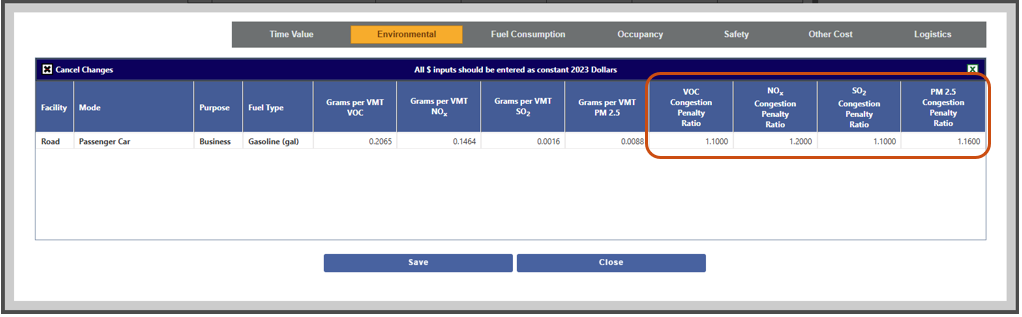
These new factors are set at 1.0000 for existing projects so that rerunning these projects would produce consistent results to the last time the project was run and other projects that were created at the same time. To take advantage of the new features, you could manually update the values for your project using Adjust Mode Factors and rerunning the project.
Alternatively, you could back up your project, delete the penalty ratios backed-up on the Mode Factors sheet contents, and reimport the project. The system defaults will be filled in on import. All newly created projects will leverage the new default values.
These variables have been added to the Mode Factors sheet of the TREDIS Import Spreadsheet. If you have old back-up files, you can continue to use those files – all changes are backwards compatible.
Setting Penalty Ratios
All congestion-based costs are based on the Percent of VMT Congested variable in TREDIS, an input in the Travel page under the Congestion tab. Incremental increases in pollutants due to congestion are determined by new ratios associated with each mode and purpose.
To view or edit the factors for an individual project, from the Modes page, click the Adjust Mode Factors button, highlighted at the bottom of the page shown in Figure 1.
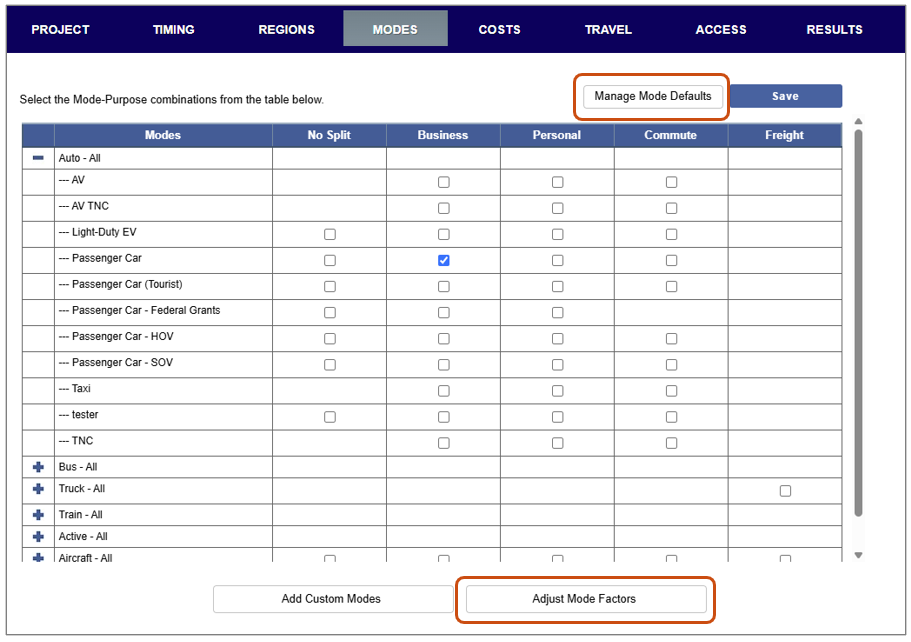
In the Adjust Mode Factors window, select the Environmental tab to view or edit the new Congested Penalty Ratio fields.
To adjust these for your custom modes so that they are consistent from project to project, select the Manage Mode Defaults button shown in Figure 1, navigate to your mode, and use the editing functionality to change it.
Footnotes
-
Speciation of Total Organic Gas and Particulate Matter Emissions from Onroad Vehicles in MOVES4. August 2023. U.S. Environmental Protection Agency. https://nepis.epa.gov/Exe/ZyPDF.cgi?Dockey=P10186EB.pdf ↩